Parts + mounts + shipping + estimated tax + 20% reserve. Assembly tools and hired labor are extra.
Target-compiled firmware. Physical assembly and field verification still required.
LapCounter 0.2: build the optical prototype
This is the current build direction. It replaces the Bluetooth-proximity counting design and contractor pricing in the earlier 0.1 report. The user authorized the engineering choice to prioritize cost and reliable lap detection over matching the illustration exactly.
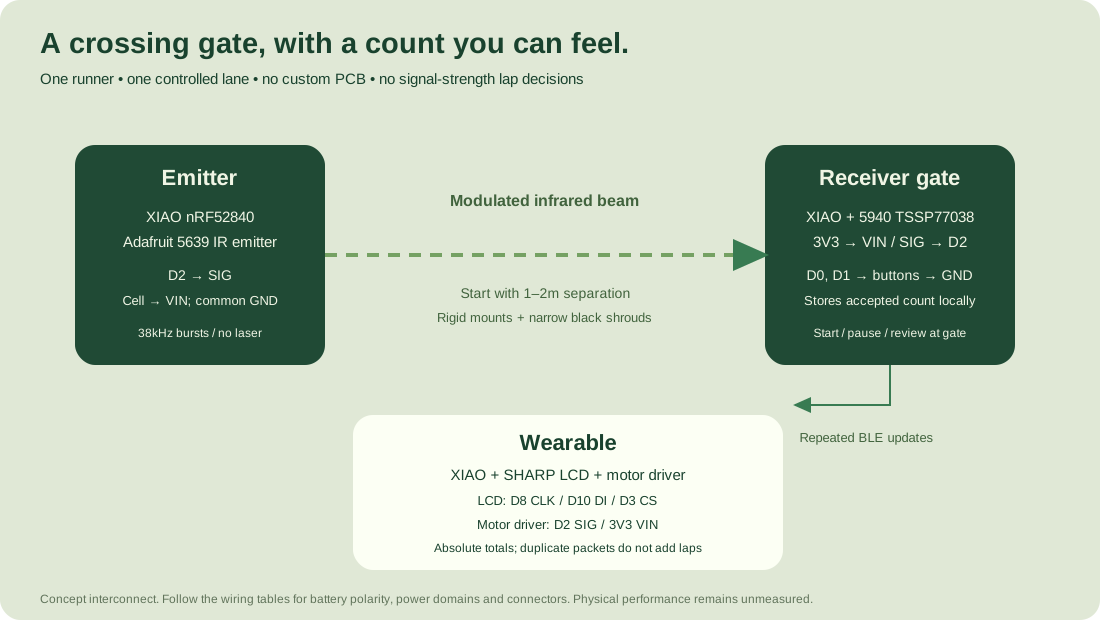
The kit has a modulated infrared emitter, a receiver gate that stores the count, and a wearable that displays and vibrates for accepted laps. Three identical standard XIAO nRF52840 boards keep purchasing and flashing simple. No custom PCB, paid firmware contractor, mobile app or cloud service is required for this version.
Firmware and build files are provided. A physical prototype has not been assembled or field-tested. Compiling firmware is not evidence of optical range, outdoor accuracy, battery life or charging safety. Someone still needs to assemble the parts and run the physical tests below. There is no labor charge included in the parts budget; hired assembly would be extra.
Budget
The itemized parts budget is in budget-parts.csv and budget.json. Core electronics use supplier listings checked on October 17, 2026. Cables, simple cases, stand hardware and small parts are labeled allowances. This is a planning budget, not an actual cart or stock reservation.
| Part | Qty | Unit | Total | Basis |
|---|---|---|---|---|
| Standard XIAO nRF52840 SKU 102010448 | 3 | $9.90 | $29.70 | Published |
| Adafruit 3502 SHARP reflective display | 1 | $24.95 | $24.95 | Published |
| Adafruit 5940 TSSP77038 receiver | 1 | $3.95 | $3.95 | Published |
| Adafruit 5639 IR emitter breakout | 1 | $3.95 | $3.95 | Published |
| Adafruit 5648 MOSFET motor driver | 1 | $3.95 | $3.95 | Published |
| Adafruit 1201 disc motor | 1 | $1.95 | $1.95 | Published |
| Adafruit 1578 protected 500mAh LiPo | 3 | $7.95 | $23.85 | Published |
| Normally open buttons | 3 | $0.75 | $2.25 | Allowance |
| STEMMA 3-pin cables | 3 | $1.25 | $3.75 | Allowance |
| Battery JST adapters | 3 | $1.25 | $3.75 | Allowance |
| USB data cable | 1 | $4.00 | $4.00 | Allowance |
| 100uF 6.3V+ capacitors | 2 | $0.50 | $1.00 | Allowance |
| Wire and insulated perfboard | 1 | $5.00 | $5.00 | Allowance |
| Generic cases | 3 | $3.00 | $9.00 | Allowance |
| Hook-and-loop wrist strap | 1 | $5.00 | $5.00 | Allowance |
| Optical clip mounts or stands | 2 | $6.00 | $12.00 | Allowance |
| Black shrouds and tape | 1 | $2.00 | $2.00 | Allowance |
| Fasteners | 1 | $2.00 | $2.00 | Allowance |
| Budget line | Amount |
|---|---|
| Parts, cases and mounts | $142.05 |
| Shipping allowance | $20.00 |
| 9% tax allowance | $14.58 |
| Subtotal | $176.63 |
| 20% contingency | $35.33 |
| Total planning budget | $211.96 |
An existing laptop, USB power, soldering iron, solder, multimeter and hand tools are assumed. Borrowing those avoids buying the $100 tool allowance in the original estimate. If you need tools, budget separately. No parts have been bought, no outside engineer has been hired, and no vendor has been contacted.
For the first bench experiment, three boards plus the two optical breakouts cost $37.60 before freight and tax. Reused USB supplies/cables can power that experiment. Add the display, haptic parts, batteries, mounts and cases only after confirming the beam behaves correctly at the intended width in daylight. The three-board design is a practical low-cost candidate, not a proven lowest price across every available product.
Why this should be more dependable than proximity counting
The receiver decides when the beam was interrupted and restored. Bluetooth carries a repeatedly broadcast absolute total, not a one-shot "increment" message. The wearable ignores repeated totals, can catch up several missed updates, and shows completion when it receives the final stored count. The gate continues counting when the wrist is out of range.
This is a controlled single-runner system. It counts anyone or anything that qualifies as a beam interruption. It cannot identify a runner, determine crossing direction, prevent a shortcut or verify a full circuit. Another person walking through the gate can add a lap. It must not be used for official test results or a shared public lane without a different design and validation.
Place the optical units outside the lane, at the same height around 0.8-1.0m, facing each other across one lane. Start testing at 1-2m separation. Nothing is stretched across the runner's path. Use narrow matte-black receiver/emitter shrouds and stable mounts. Do not claim an all-lane range from the sensor's data sheet.
The modulated receiver is less vulnerable to simple ambient-light changes than a bare unmodulated phototransistor. Direct sun, reflections, wind movement, clothing and interfering IR sources still require measurement. A beam that is too weak or goes around a runner by reflection is a failed setup, even if the electronics power on.
Buy the exact board variant
Use standard Seeed XIAO nRF52840 SKU 102010448 for all three boards, with the factory nRF52840 UF2 bootloader. The compiled target is Seeeduino:nrf52:xiaonRF52840 using Seeed nRF52 core 1.1.13. These files are not for XIAO ESP32, nRF54, Plus, RP2040 or a generic Arduino Nano.
The standard board costs less than Sense because this design does not use an IMU or microphone. The supplied binaries target the standard board only. A Sense substitution needs its own compile and pin review; do not flash a similarly named board blindly.
Wiring: emitter
| Board point | Connect to | Note |
|---|---|---|
| XIAO D2 | Adafruit 5639 emitter SIG | Hardware-generated 38kHz carrier bursts |
| Protected battery positive | XIAO BAT+ and emitter VIN | Branch the protected cell after its connector; never use a bare cell |
| Battery negative | XIAO BAT- and emitter GND | Common ground on this unit |
| 100uF capacitor | Emitter VIN to GND | Positive lead to VIN; rated at least 6.3V |
For the initial bench test, use USB power and connect emitter VIN to the XIAO's 5V/VBUS pin instead of a battery branch. Do not join the 5V pin and battery positive. For a battery test use the protected 1S cell branch described above. Do not power the high-current emitter through the XIAO 3V3 regulator.
The emitter breakout includes its transistor and LED resistors. No laser is used. Firmware emits about 1ms of 38kHz carrier followed by at least 4ms off. Average LED duty is at most about 10%, accounting for the carrier's 50% duty. Measure the waveform and LED temperature on real hardware before extended use. The SDK's tone() function rejects 38kHz; the firmware intentionally uses hardware PWM instead.
Wiring: receiver gate
| Board point | Connect to | Note |
|---|---|---|
| XIAO 3V3 | Adafruit 5940 receiver VIN | Receiver signal then stays in 3.3V logic domain |
| XIAO GND | Receiver GND and both button returns | No cross-lane ground wire |
| XIAO D2 | Receiver SIG | Interrupt input; receiver is active low during each received burst |
| XIAO D0 | Normally-open button A to GND | Target/start control |
| XIAO D1 | Normally-open button B to GND | Pause/review/new-run control |
| Protected 500mAh cell | BAT+ and BAT- through matching connector | Verify actual connector polarity before connecting |
The onboard green LED indicates at least one second of stable beam alignment. Red blinking indicates review or a fault. LED polarity follows the selected board schematic and remains to be checked on the received hardware. Read the wearable or USB STATUS output if LED behavior is unclear.
Wiring: wearable
| Board point | Connect to | Note |
|---|---|---|
| XIAO 3V3 | Adafruit 3502 LCD VIN and Adafruit 5648 motor-driver VIN | Regulated motor supply; no raw LiPo on this rail |
| XIAO GND | LCD GND, motor-driver GND and button return | Common ground on wrist unit |
| XIAO D8 | LCD CLK | Serial clock |
| XIAO D10 | LCD DI | Serial data |
| XIAO D3 | LCD CS | Chip select |
| XIAO D2 | Motor-driver SIG | On/off haptic control |
| Motor-driver output + | Motor red lead | Use the switched output terminals, not MCU GPIO |
| Motor-driver output - | Motor blue/negative lead | Breakout includes flyback diode |
| 100uF capacitor | Motor-driver VIN to GND | Observe capacitor polarity |
| XIAO D0 | Normally-open button to GND | Short press mutes; hold two seconds and release resyncs |
| Protected 500mAh cell | XIAO BAT+ / BAT- | No cell compression or exposed battery joints |
Use the reflective 144x168-native-pixel SHARP module in landscape rotation, producing a 168x144 UI. It costs more than a small generic OLED but avoids gambling on an unspecified display module and prioritizes daylight reading. There is no backlight for night use. The driver refreshes every 500ms to maintain VCOM inversion even when the count is unchanged.
The simple MOSFET haptic driver replaces the more expensive DRV2605L in the original design. It supports clear on/off patterns without I2C setup. The selected motor is powered at 3.3V. Verify rail droop and no resets when the motor starts. There is no battery percentage estimate in this build; the separate fuel gauge was removed to save cost. Measure runtime and check battery voltage before longer sessions.
Assemble without custom manufacturing
Use insulated perfboard/wire carriers and cheap generic plastic cases. Secure the boards so they cannot touch the battery. Keep the radio board near a plastic edge, with its antenna clear of the motor, battery and metal mounts. Put the receiver behind a narrow black tube, not behind clear plastic of unknown infrared transmission.
Strap the wrist case securely but comfortably with hook-and-loop material. It will be bulkier than the illustration. The supplied old 0.1 CAD is not the correct verified mounting layout for this revised kit. Do not order a custom print or PCB from that drawing. A custom sealed watch case is unnecessary for the first dry-weather proof.
Charge off the wrist, on a suitable surface, using the board's documented approximately 50mA charge setting. The supplied firmware selects the low-current setting and keeps the battery-read control low. Actual charge current, temperature and connector polarity must be checked. A 500mAh cell may take around 12-14 hours at 50mA including taper; this is an estimate. The board charger does not make the complete enclosure a certified wearable battery product.
Flash the supplied files
1. Disconnect the battery and motor while first flashing the wrist unit. Label the three boards EMITTER, GATE and WRIST.
2. Plug one board into the computer with a USB data cable. Double-press its reset button to enter the factory UF2 bootloader. A removable drive should appear.
3. Check that the board is the standard XIAO nRF52840. Copy only the matching file: binaries/emitter/emitter.uf2, binaries/gate/gate.uf2 or binaries/wearable/wearable.uf2.
4. Let the board finish and reboot. Repeat for the other two boards. Do not unplug during a copy.
5. The supplied application UF2 files assume the compatible factory bootloader and S140 7.3.0 SoftDevice. They do not install a bootloader or repair an incompatible SoftDevice. If the drive is absent or the application fails to start, use the pinned Arduino board package and its documented serial upload route. Do not flash another board's bootloader.
These are real target-compiled binaries, not files generated from the browser simulation. They have not been flashed to hardware in this workspace because no target board is connected. USB boot behavior and first boot remain physical checks.
Start an eight-lap run
1. Turn on the emitter and receiver. Align them while watching the gate's green indicator and the wrist's beam status. Keep the lane clear. A stable beam must be visible for a full second before start or resume.
2. Turn on the wrist unit. It finds kit ID 1 automatically. The screen shows the gate's target and count. There is no phone pairing step.
3. Default target is eight. While READY, a short press of gate A increases the target and wraps after 99. To use a lower number quickly, change it in source and rebuild, or cycle the button. Keep the wrist nearby to see the selected target.
4. Stand just before the start line. Hold gate A for two seconds and release. It starts when the beam is aligned. The first immediate crossing is ignored by the minimum-lap rule, leaving the initial count at zero.
5. Complete the full circuit. A qualifying crossing increments the gate's stored count, then the wrist receives the total and vibrates once. The target lap gives three longer pulses. No further automatic counts are accepted after completion.
6. A short gate-B press pauses. Another short B press resumes only with stable alignment and resets the minimum interval. Controls are deliberately on the gate in this cheap version; the wrist is a display/haptic receiver, not a long-range remote control.
7. Hold gate B for two seconds and release while PAUSED or COMPLETE to create a new run. It cannot reset a running or review-required session. Logs remain stored until explicitly erased.
Default minimum lap is 45 seconds. For a shorter loop or unusually fast runner, change it deliberately before a run with MIN <seconds> over USB, in READY state. Valid range is 10-600 seconds. A cooldown cannot prove a full circuit; the runner must follow the intended route.
Detection and recovery behavior
The emitter sends short modulated bursts. The receiver adapter requires three correctly spaced pulse intervals around the expected 5ms period and a fresh pulse within 10ms. A stuck-high or stuck-low receiver cannot establish beam readiness. Spurious pulses and timing variation still need real measurements; the 4-9ms interval tolerance is an initial setting.
After the inferred beam goes away, an obstruction must last at least 15ms. The beam must then return and remain clear for 80ms before a lap is accepted. The minimum-lap interval must also have elapsed. Glitches shorter than 15ms are discarded. Beam loss longer than 1.5 seconds enters REVIEW rather than inventing a lap. Initial settings target approximately 2-8m/s crossing speeds; test the actual runner and gate height.
Receiver reboot recovers the latest CRC-valid record into REVIEW. A short B press acknowledges it into PAUSED; a second short B press resumes after stable alignment. No automatic events occur during review or pause. If storage is corrupt or full, counting stops with a fault. Export the valid prefix, inspect the raw capture and deliberately erase only after preserving evidence.
The wearable receives absolute count snapshots. Duplicates do not vibrate again. If multiple counts arrive after a link gap, it shows the current total and a catch-up message. An initial sync to a run already in progress is silent. If you power the wrist off through the final lap, it can display the final total when powered back on, but it cannot retrospectively deliver a live cue. Hold its button for two seconds and release to resync if the gate has been replaced or its storage reinitialized.
USB log and review tools
Connect the receiver gate, not the emitter, at 115200 baud. Line endings must include newline. Commands are STATUS, EXPORT, MIN 10..600, SET 0..target and ERASE YES. MIN is allowed only in READY. SET is a manual count correction allowed only while PAUSED and recorded separately. EXPORT and ERASE are refused while running. ERASE permanently removes stored records; it is never called automatically by the exporter.
The gate appends a fixed 32-byte CRC-protected record before publishing each accepted count. It rereads the record and verifies the CRC before allowing the new count to reach the wrist. Records include session, event type, count, target, elapsed milliseconds and configuration. Power interruption around writes still needs hardware testing. Partial records or corrupt tails stop automatic counting rather than being silently skipped.
The journal is bounded at 400 records. Export and archive it between test sessions. No automatic log rotation destroys old data. The desktop tool below verifies every record CRC, sequence ordering and frame footer, and refuses to overwrite an existing output.
python3 -m pip install pyserial
python3 tools/export_gate.py --port /dev/cu.usbmodemYOUR_GATE --out run-001.csv
Run the commands from the firmware directory and use the actual receiver serial port. First pause the gate. The exporter preserves a raw text capture alongside the verified CSV and leaves the gate log intact. Without pyserial, a serial terminal can issue EXPORT and save the raw frame; the Python verifier is still needed before treating that export as checked.
Rebuild from source
Use the provided UF2 files for the simplest first build. To change target defaults, kit ID or timing parameters, install Arduino CLI, then run the following from the firmware directory. Dependencies are pinned, and installation stays local to this project. The script uses a temporary source path without spaces to work around an SDK build-recipe issue.
python3 tools/build.py --install-depsOnce dependencies are installed, python3 tools/build.py rebuilds all three images. Standard XIAO is the only tested compile target. Library versions are Seeed nRF52 1.1.13, SHARP Memory Display 1.1.4, Adafruit GFX 1.12.6 and BusIO 1.17.4. The build manifest records the actual compiler and binary hashes. No external CI account or paid compiler is needed.
Host checks can be run with a C++17 compiler and Python. They exercise the actual shared counting/protocol code, rather than a separately rewritten JavaScript model.
clang++ -std=c++17 -Wall -Wextra -Werror -fsanitize=address,undefined -I libraries/LapCounter/src test/gate_test.cpp -o /tmp/lapcounter-tests
/tmp/lapcounter-tests
python3 test/export_test.py
Physical acceptance checklist
1. Check board and connector identities, no supply shorts and correct cell polarity. First bring up on USB with batteries disconnected. Confirm regulated 3.3V before attaching the LCD or receiver.
2. Measure the emitter at D2: approximately 38kHz, 50% carrier duty, about 1ms on and at least 4ms off. Confirm the receiver's corresponding pulses and stable alignment. Inspect emitter temperature during a 30-minute run.
3. Verify the wrist LCD orientation, motor direction/connection, supply droop and absence of resets. Read the count outdoors at arm's length. Verify that the final haptic differs from an ordinary lap.
4. At the real venue, test shadow, bright daylight, different sun angles and intended lane width. Block the direct path completely; reflected IR must not keep the receiver seeing a clear beam. Test wind/vibration and record any loss of alignment.
5. Perform ten observed test crossings with a deliberate short-loop profile and enough interval between crossings. Log misses, duplicates and false counts individually. Reject any configuration that needs the runner to hold their wrist a special way.
6. Restore the proper full-track minimum interval. Run three 20-lap sessions in the designated lane, with different runners or clothing and at least two daylight conditions. Require zero misses, duplicates or unexplained events in this 60-lap demonstration before describing this configuration as a working prototype. This small demonstration does not prove 99.9% reliability.
7. Walk through immediately after start, wait in/near the beam, pause/resume, interrupt the emitter, reboot the gate and switch off/recover the wrist. No invented lap may occur. Prolonged beam loss must require review. On receiver reset, the last saved count must be recovered.
8. Interrupt power around journal writes on a protected bench setup and inspect raw logs. Export CRC checks must identify corruption. Verify recovery into review and deliberate erase after archiving. This has not been tested on a physical device here.
9. Measure operating and charge currents, full-charge behavior, run duration and cell temperature. Do not infer battery endurance from chip current specifications. Use dry weather until case protection has been designed and tested.
If the optical link does not pass at the actual site, the correct next step is an industrial outdoor photoelectric gate or another validated sensor, not an accuracy claim based on passing software tests. That may increase parts cost. Do not spend on miniaturization until this first physical result is known.
Sources
• Seeed XIAO standard and Sense listing. Standard SKU 102010448 is listed at $9.90.
• Seeed pin map, charging and board-package setup.
• Adafruit 3502 reflective memory LCD, $24.95.
• Adafruit 5940 modulated IR receiver, $3.95.
• Adafruit 5639 IR emitter, $3.95. Pulsed operation is required at its higher drive currents.
• Adafruit 5648 MOSFET motor driver, $3.95, with flyback protection.
• Adafruit 1201 motor, $1.95.
• Adafruit 1578 500mAh battery, $7.95. Confirm the protected variant and connector polarity.
• Vishay TSSP770 data sheet and light-barrier application note. Modulated reception supports a light-barrier design; practical sunlight performance depends on alignment and optical geometry.
Supplier pages establish parts and specifications, not this assembled kit's measured reliability. All timing thresholds, mounting dimensions, current expectations and field-test criteria above are engineering choices to verify.